How to Print Business Cards Designed with ChatGPT or AI
Have you used ChatGPT, Gemini, Copilot or another AI tool to design a business card? If you're happy with the design, the next step is getting it professionally printed so you can start handing it out to customers.
The good news is that you don't need to use a business card template or recreate your design in specialist software. You can supply your own AI-generated artwork to an online printer, provided the file is suitable for printing.
At Short Run Print, we've made ordering straightforward, particularly for people who only need a small quantity. You can upload your own design, check the artwork preview and order professionally printed UK business cards from just 20 copies.
Quick answer: Yes, you can get business cards designed with ChatGPT or other AI tools professionally printed. Download your finished artwork, check the size and contact details, choose your business card printing options and upload the design. You can then check the preview and complete your order online.
Already Have Your AI-Designed Business Card?
If your design is ready, you can go straight to ordering. Upload your existing artwork and order professionally printed UK business cards from just 20 copies.
Can I Print a Business Card Designed by ChatGPT?
Yes. If ChatGPT has created a business card design for you, the finished artwork can be used for professional printing, provided it has suitable dimensions, image quality and content.
The same applies to designs created using Google Gemini, Microsoft Copilot and other AI image-generation tools.
From a printing point of view, what matters most is the artwork itself rather than the application used to create it.
For example, if you've asked ChatGPT to create a business card for your plumbing business, gardening service, cleaning company or another UK business, you can use that design as the starting point for your printed cards.
Where Can I Get My AI-Designed Business Cards Printed?
You can order AI-designed business cards from an online printing company that allows customers to upload their own artwork.
Some printing websites concentrate on pre-designed templates, where you choose an existing layout and change the wording. That isn't particularly helpful if you've already spent time getting an AI tool to create a design you like.
Short Run Print takes a different approach. You choose the type and quantity of business cards you want and upload your finished artwork when ordering.
This means you can use your own business card design rather than selecting a template and starting again.
Do I Need a Graphic Designer to Prepare My AI Business Card?
Not necessarily. If your AI-generated design is already suitable for printing, you may be able to upload it without making further changes.
However, AI tools don't always produce artwork in standard printing dimensions, and some designs may need adjustments before they are ready to print.
The most important things to check are the size, proportions, image resolution, text and positioning. We'll explain these below so you can decide whether your design is ready to upload.
1. Download Your AI-Generated Business Card Design
Once you're happy with your business card design, save or download the finished artwork from the AI tool you used.
Depending on the service, you may be able to download the image as a JPG, PNG or another suitable format.
Where possible, choose the highest-quality version available rather than taking a screenshot of the design.
If you've used another application to adjust the artwork, a high-quality PDF may also be a suitable option. Check the accepted file formats when uploading to Short Run Print.
2. Check the Business Card Size
One of the most important things to check is whether your AI-generated artwork matches the shape of a standard business card.
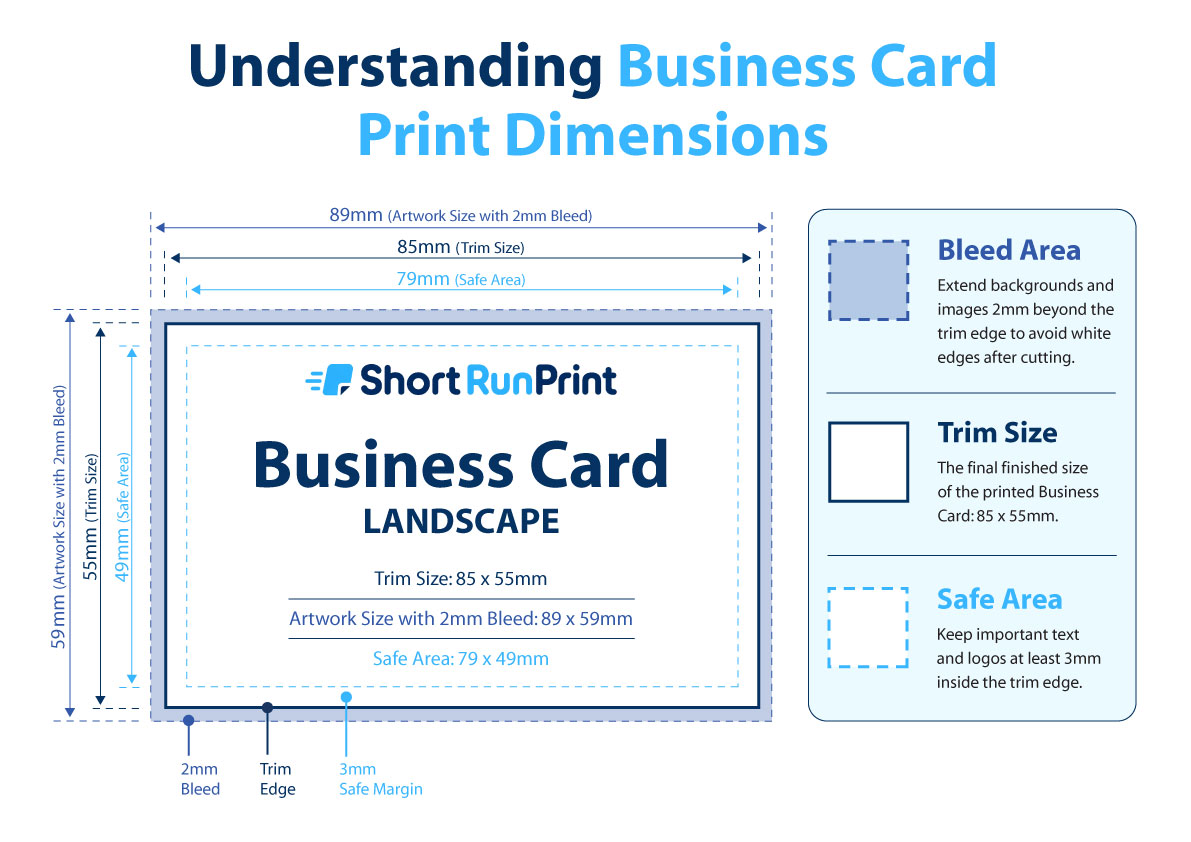
The standard UK business card size is 85 × 55 mm. This is the format most commonly used by UK businesses.
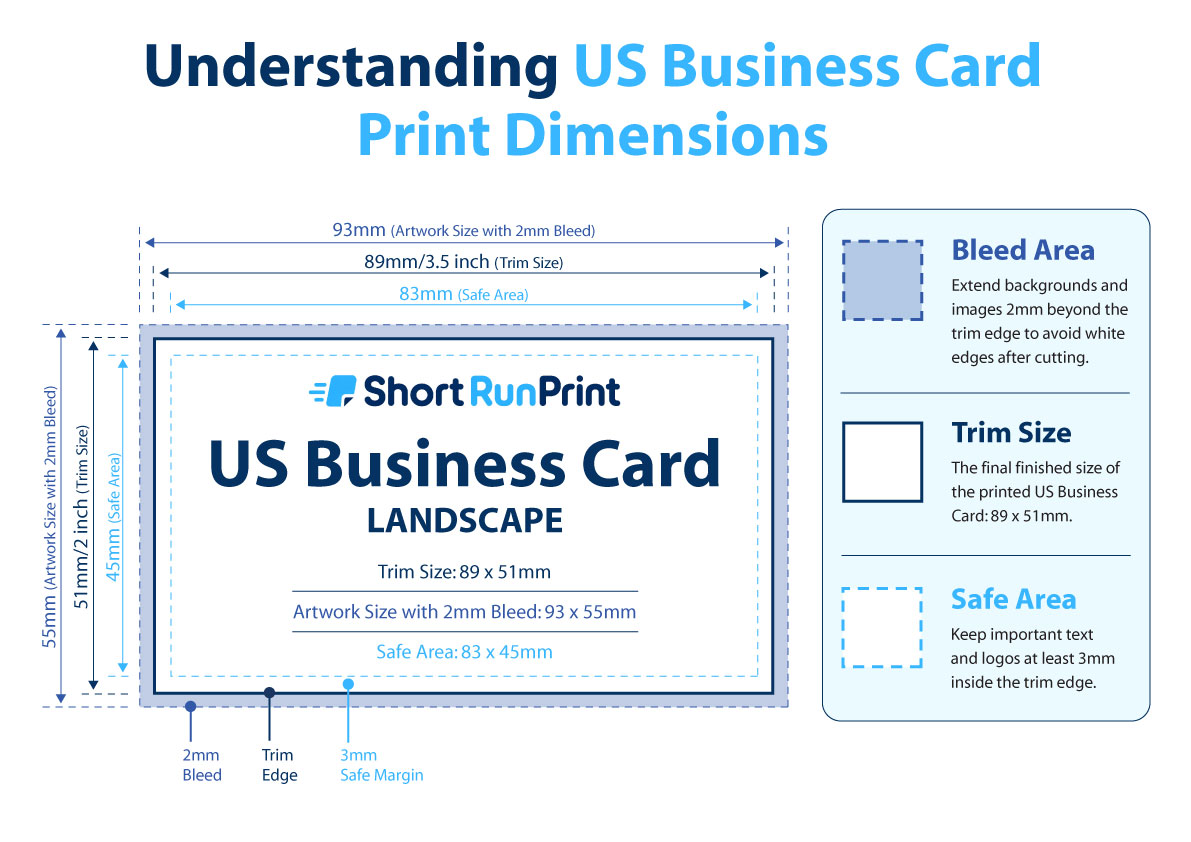
Short Run Print also offers US-sized business cards measuring 89 × 51 mm.
These two sizes have slightly different proportions, so it's worth checking which one matches your design.
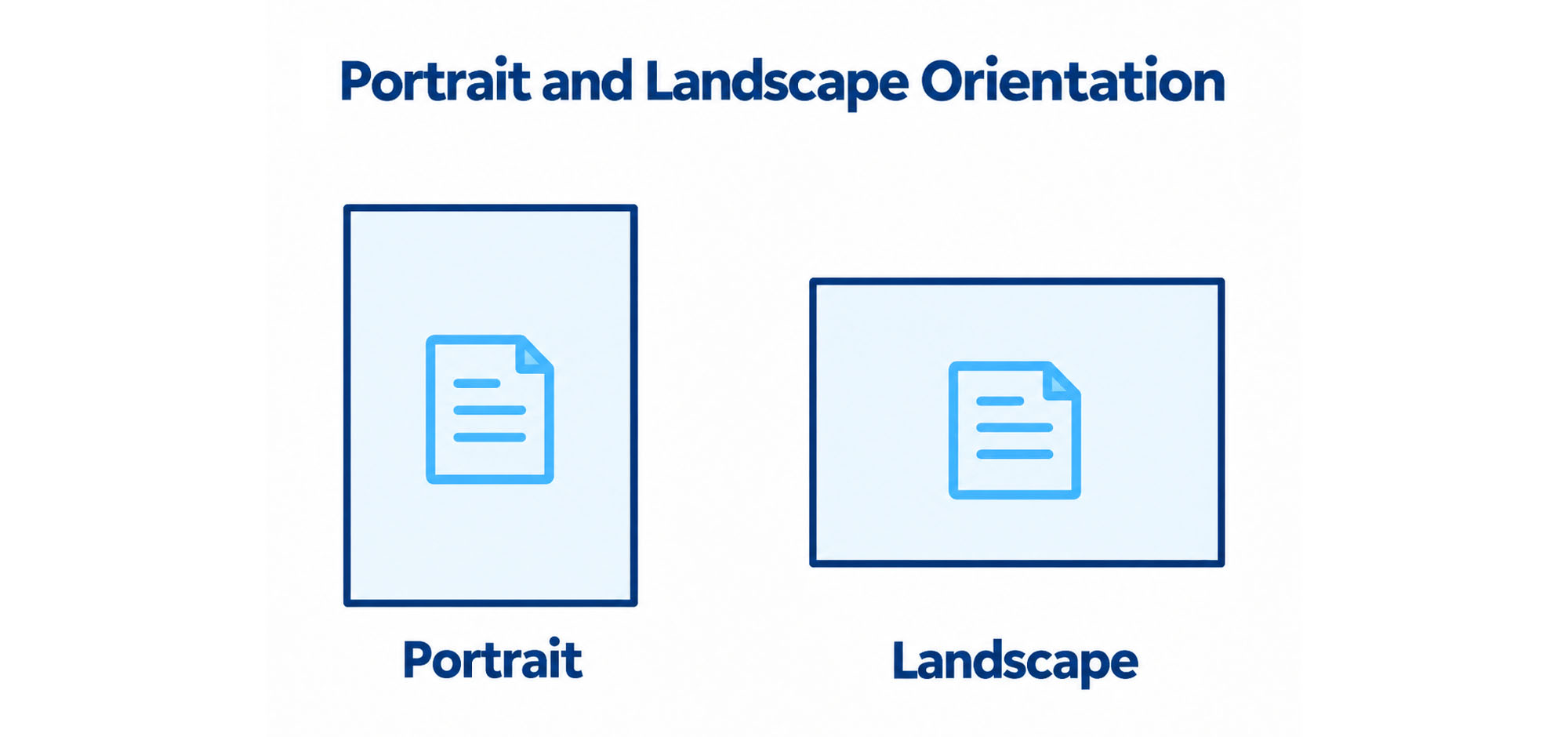
AI image generators sometimes create business cards that are too square, too tall or otherwise different from standard printing formats. If the proportions are incorrect, the design may need to be adjusted or cropped to fit.
What If ChatGPT Has Made My Business Card the Wrong Size?
If your design doesn't match standard business card proportions, you can ask the AI tool to recreate or adjust it using the correct dimensions.
For example, you could ask it to produce a landscape UK business card with proportions matching 85 × 55 mm, keeping the existing design and contact details.
Wherever possible, it's better to correct the proportions before ordering than to force an incorrectly shaped image to fit by stretching it.
3. Check That the Text and Contact Details Are Correct
This is particularly important with AI-generated business cards.
Although AI image-generation tools can produce attractive designs, they can sometimes make mistakes with lettering, numbers and small details.
Before downloading your finished artwork, carefully check:
- Your business name
- Your name and job title
- Telephone and mobile numbers
- Email addresses
- Website addresses
- Any postal address
- Spelling of services and other text
- Logos, icons and decorative details
Don't rely on how the text looks at first glance. Zoom in and check every word and number against the information you originally supplied.
If you've included a QR code, scan it to make sure it works and points to the correct destination. AI-generated images may contain shapes that resemble QR codes without actually functioning.
4. Check the Resolution of Your AI Artwork
Business cards are relatively small, so a good-quality AI-generated image may contain enough detail to produce a sharp printed result.
However, it's still important to check the quality of your file.
For raster artwork, approximately 300 pixels per inch (ppi) at the finished printed size is a useful target.
If you've downloaded a very small image and enlarged it considerably, fine text and details may appear soft or pixelated when printed.
Use the largest suitable version of your design available from the AI tool. Avoid using a screenshot when you can download the original artwork instead.
5. Allow for Bleed and Keep Text Away from the Edge
If your business card has a background colour, photograph or graphic that reaches the edge, the artwork should extend slightly beyond the finished dimensions.
This additional artwork is known as bleed.
At Short Run Print, we require 2 mm bleed where artwork prints to the finished edge.
For a standard UK business card:
- Finished size: 85 × 55 mm
- Artwork including 2 mm bleed: 89 × 59 mm
- Recommended safe area: 3 mm inside the finished edge
Background colours and images should continue into the bleed area, while names, telephone numbers, logos and other important information should stay inside the safe area.
If you're unfamiliar with these terms, our
guide to bleed, trim and safe areas
explains them with practical examples.
6. Decide How Many Business Cards You Need
One advantage of using an AI tool to design your own business card is that you may want to order a small quantity first to see how the finished design looks.
You don't necessarily need hundreds of cards, especially if you're just starting a business, trying a new design or only hand out cards occasionally.
At Short Run Print, business card quantities start from just 20 cards.
A small batch can be useful if:
- You've just started a business and are trying a new design.
- You want to see your AI-generated artwork professionally printed before ordering more.
- You only occasionally give out business cards.
- You're attending a meeting, exhibition or networking event.
- Your contact details or branding may change.
- You want to avoid ordering more cards than you need.
If you'd like more advice on choosing a quantity, read our
guide to small quantity business card printing.
7. Upload Your AI-Designed Business Card to Short Run Print
Once you've checked your artwork, you're ready to order your business cards.
Our ordering process is designed to make it straightforward for customers to supply their own files, even if they aren't familiar with professional printing.
- Visit our business card printing page.
- Choose the quantity and available printing options you need.
- Click Add to Basket and Upload.
- Choose your AI-generated artwork file and upload it.
- Check the low-resolution preview of your design.
- Adjust the scale of your artwork if required.
- Continue to your basket and check the artwork preview again.
- Select your delivery option and complete the order.
You don't need to choose a pre-designed business card template or enter all of your contact details again. The artwork you've created is the design that will be used for printing.
Just make sure you're completely happy with the file before placing your order.
8. Check the Preview Before Ordering
After uploading your file, Short Run Print displays a low-resolution preview showing the content and positioning of your artwork.
This is particularly helpful if the AI tool has generated a business card design with slightly different proportions from the finished card you're ordering.
You can adjust the artwork scale if required, but be careful that important information doesn't get cropped or moved too close to the edge.
The preview is intended to show content and positioning rather than guarantee the technical quality of your original file. If you notice something wrong with the design, correct it and upload the new version before ordering.
Can I Print AI-Designed Business Cards on Both Sides?
Yes. You can choose a double-sided business card product if you want artwork on both the front and reverse.
For example, you might have asked ChatGPT to create a business card with your company logo on the front and your contact details on the back.
Alternatively, the front might contain your business name, logo and telephone number, while the reverse lists the services you provide.
Make sure you have the correct artwork for both sides and check each design carefully when uploading.
Can I Print an AI Business Card for Any Type of Business?
Yes. The process is the same whether you've created a business card for a trade, a local service business or another type of company.
For example, customers may use AI to create designs for:
- Plumbers and heating engineers
- Electricians and builders
- Gardeners and landscapers
- Window cleaning businesses
- Domestic and commercial cleaners
- Driving instructors
- Dog walkers and pet services
- Hairdressers and beauticians
- Personal trainers
- Other self-employed and local businesses
Whatever type of business you have, you can supply your own design. You don't need a separate business card template for your particular trade.
What If I Want to Change My AI Business Card Later?
One of the advantages of ordering business cards in smaller quantities is that you can update your design between orders.
You may want to change your business name, telephone number, logo, services or overall layout.
Simply update the artwork using your preferred AI or design application, save the new file and upload it when placing your next order.
Can I Use AI-Generated Business Card Artwork Commercially?
Before printing AI-generated designs, check that you are permitted to use the artwork commercially under the terms of the service you used.
It's also important to check that the design doesn't reproduce another business's logo, protected branding or other material that you don't have permission to use.
If you've asked an AI tool to create an original design for your own business, review the result carefully before using it as part of your branding.
Designed it with AI? You can get it printed. Check your business card's size, image quality, wording and bleed, then upload the finished artwork when ordering. At Short Run Print, you can start with just 20 business cards rather than committing to hundreds.
Common Questions About Printing AI-Designed Business Cards
Where can I print a business card made with ChatGPT?
You can order professionally printed business cards from Short Run Print using artwork you've created with ChatGPT. Choose your business card options, upload your design, check the preview and complete your order online.
Can I upload a business card design made with AI?
Yes. Short Run Print allows you to upload your own artwork, including suitable designs created with AI tools such as ChatGPT, Gemini and Copilot. You don't need to select a pre-designed business card template.
Do I need to recreate my ChatGPT business card in Canva?
Not necessarily. If your existing artwork has suitable dimensions, resolution, bleed and correct information, you may be able to upload it directly. If changes are needed, you can make them using your preferred design application.
What size should I ask ChatGPT to make my business card?
For standard UK business cards, ask for a landscape design matching 85 × 55 mm proportions. If the design prints to the edge, the complete artwork should also allow for the additional bleed required by your printer.
Can I print an AI business card from a JPG or PNG?
A suitable high-quality JPG or PNG can be used for professional printing when the printer accepts that format. Check that the artwork is large enough, has the correct proportions and includes any required bleed before uploading.
Can I print just 20 AI-designed business cards?
Yes. Short Run Print offers UK business cards starting from just 20 copies. This is useful if you're testing a new design, starting a business or only need a small batch.
Can I print AI-designed business cards on both sides?
Yes. Choose a double-sided business card product and supply the artwork for the front and back. Make sure both designs use the correct proportions and contain the information you want printed.
Will my AI business card look the same when printed?
The finished printing should reproduce your supplied artwork, but some differences between the screen and printed result are normal. Colours may appear different, and image sharpness depends on the resolution and quality of the original file.
Can I resize my AI business card when uploading?
Yes. Short Run Print allows you to adjust the scale of your uploaded artwork. However, resizing may crop part of the design or affect its quality, so starting with correctly proportioned artwork is preferable.
Do I need printing knowledge to order my AI business cards?
You don't need specialist printing knowledge to place an order. Each product page includes an Artwork Guide showing the finished dimensions, bleed and recommended safe area, and the uploader provides a low-resolution preview before checkout.
Ready to Print Your AI-Designed Business Cards?
If you've created your business card using ChatGPT, Gemini, Copilot or another AI tool, you can upload your existing design and order professionally printed business cards from Short Run Print.
With quantities starting from just 20 cards, free standard delivery and a straightforward artwork upload process, you can order the cards you need without having to start your design again.
Free standard delivery on every order • Printed in the UK